Decisions locked (from the whiteboard)
- The website is a front door, not a brochure. One job: turn a stranger into a name on your list.
- The homepage's one job is capture, not impress. The pages you need are Home, About, and your Offer. Inquire is a button on every page, not a page. Skip the rest until these convert.
- The booking path: land, believe (proof), one clear ask, a name on your list. Everything on the page points to the ask.
- Copy is clarity over clever. If they can't tell what you do in five seconds, it's too clever.
- ★ KEY LESSON, own your domain separate from your website. Your domain is your address, kept in your own account, in your name, no matter who builds the building.
- Keep the keys. You can update your own pictures, blog, and pages, change a word without a bill, with no long-term lock-in. Done-for-you is fine and smart CEO leverage, but you must be able to export all your files and information and port to another system without going dark.
- The cautionary tale (real): an advisor's site was on a locked-in platform; they missed one payment and the whole business was shut down online. That's why we stress control.
- The fork: build it yourself (Wix is fine, and you'll actually finish) or have it built (keep every key). A host-agency template, filled with your key info, beats nothing.
- Speed and mobile win. Wix and Squarespace carry overhead, load heavier, and are less SEO-friendly. A fast, simple site beats a slow, fancy one.
- Second Mate (never Co-Pilot) drafts the homepage, about, and offer copy from a few prompts, in your voice.
- Domain + DNS setup is its own library course (confirmed), logged on the side list.
The spine — beat order
Your website is a front door with one job: turn a stranger into a name. Build the few pages you need, point everything at one clear ask, keep it fast, and above all keep the keys, own your domain and your content so no one can ever lock you out.
- A front door, not a brochure
- The homepage's one job: capture
- The pages you actually need
- The booking path (the front door, drawn)
- Copy that converts: clarity over clever
- Own your domain, separate from your site
- Keep the keys (control + portability)
- The cautionary tale: one missed payment
- Build it yourself, or have it built
- Speed and mobile win
- Your first brick: map your pages
- Your Second Mate writes the copy
- Want a hand? (the hook)
- Into 2.4
The anchor diagram — the front door, drawn
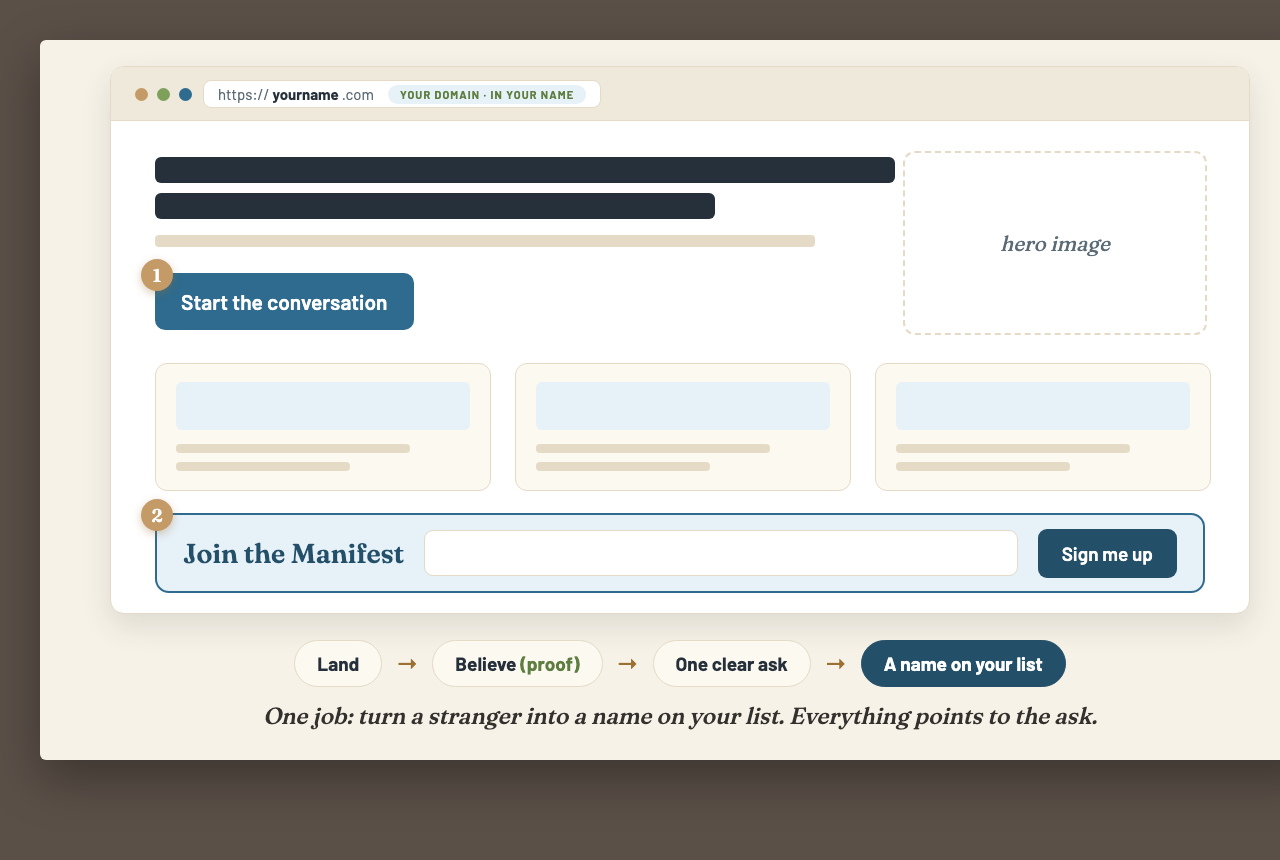
Your domain in your own name, one clear ask, and a capture block. The path: land, believe, ask, a name on your list.
The teaching script — Robert's voice
A front door, not a brochure
Most advisors think of their website as a brochure, something pretty to admire, a place to show off. That is the wrong picture. Your website is a front door, and a front door has one job, to let the right people in. More than that, it has a doorbell. Its whole purpose is to take a stranger who found you and turn them into a name on your list. If your site is not doing that, it is just an expensive brochure hanging in an empty hallway.
The homepage's one job
So the homepage has exactly one job, and it is not to impress anyone. It is to capture. Not to win a design award, not to list every place you have ever booked. Make one clear promise, and make it dead easy for someone to raise their hand. I would rather have a plain homepage that quietly captures names every week than a gorgeous one that nobody ever acts on. Impress less. Capture more.
The handful of pages you need
You do not need twenty pages. You need three. Home, your front door with one promise and one ask. About, because they are hiring a human, so tell them your niche and your story. And your Offer, the packaged signature trip we built back in 2.1, with a clear way to ask about it. That is the whole list. And notice, Inquire is not a page, it is a button on every single page. Do not add a blog, a portfolio, a press section, until those three are actually converting.
The booking path
Here is how a visitor actually becomes a lead. They land. They believe, that is where your proof does its work, the testimonials, the years, the photos. Then you give them one clear ask, not five, one. And they raise their hand, and now they are a name on your list. Every single thing on that page should be quietly pushing them down that path toward the ask. If a section is not helping them raise their hand, cut it.
Clarity over clever
Now the words. The single biggest mistake I see is people trying to be clever. Clever loses. Write for the visitor, not for an award. Say exactly who you help and exactly what to do next, in plain English. I plan trips for book lovers. Start the conversation. A confused visitor never books, and a headline so clever they cannot tell what you do is just confusion in a nicer font. If they cannot understand you in five seconds, rewrite it simpler.
Own your domain, separate from your site
Now the most important thing in this entire session, and almost nobody tells you this. Own your domain, and own it separately from your website. Your domain name is your address. It should live in your own account, registered in your name, no matter who builds the actual site. Think of it this way. The address is yours forever. The building you can rent, you can move, you can rebuild. But if you ever let someone else hold your address, you do not really own your business online. You are a guest in it.
Keep the keys
And this goes beyond the domain. You have to keep the keys to the whole thing. You should be able to update your own pictures, write your own blog post, add a page, and change a single word without it costing you hundreds of dollars and a week of waiting on a developer. No long-term lock-in contract. And here is the one I cannot stress enough, you must be able to get all of your files and all of your information and port it over to another system. Hiring it out is fine, that is smart, that is being the CEO of your business. But being locked out of your own business is not. Done-for-you, yes. Locked-out, never.
One missed payment
Robert's real example, told straight, no embellishment.
Let me tell you why I am so firm about this. We recently saw an advisor who had paid a service to design their website for them. Lovely site. But it was built on a locked-in platform that they did not control. And the day they missed one payment, just one, their entire business was shut down online. Gone. Every inquiry, every page, dark. Not because their business was bad, but because they never held the keys. Do not let that be you.
Build it yourself, or have it built
So how do you actually do this? Two honest paths, both fine. Build it yourself, and Wix is perfectly good for that, and the real advantage is you will actually finish it, a simple site that exists beats a perfect site that never launches. Or have it built, which is smart leverage, on one condition, you keep every key and you can port it all out. And if your host agency handed you a template, use it, do not let it sit there, fill it with your key info and put it to work. Better than nothing, every time.
Speed and mobile win
One more thing, whatever you build on. Speed matters, and mobile matters, because most of your visitors are on a phone and a slow page loses them before they read a word. Be aware, the easy builders like Wix and Squarespace carry a lot of overhead, they load heavier and they are not as friendly to Google. I am not telling you not to use them, I am telling you to keep your site light. A fast, simple site beats a slow, fancy one every single time.
Your first brick: map your pages
Here is your work, and this is build-with-you, so we do it together. Map your pages, just the three to start. Write your homepage headline, who you help, in plain words. And decide your one primary call to action, the single thing you want every visitor to do. Not a menu of options. One. By the end you have the skeleton of a site that has a job.
Your Second Mate writes the copy
Real jobs, not just rewriting: draft all three pages plus SEO titles, run a 5-second clarity test as a stranger, and draft the keep-the-keys questions for a developer. Copy-paste prompts in the library, How to Prompt Your Second Mate.
And if the writing is the part that stops you, this is exactly what your Second Mate is for. Give it a few prompts about your niche and your offer, and it will draft your homepage, your about page, and your offer page in your voice. You are not staring at a blank page anymore. You are editing a solid first draft into the truth. The AI writes the first version. You make it sound like you.
Want a hand with this part?
And if domains and hosting and DNS make your eyes glaze over, you are not alone, and you do not have to figure it out solo. Three doors. Bring your questions to Professor Hours. Book a one-on-one and we will set it up together, screen to screen. Or hire us and we will build the whole thing for you, with the domain in your name and the keys in your hand. We even have a dedicated library course on domains and DNS. You are never doing this alone.
Into 2.4
You have got a front door now, and it has a doorbell. Visitors are going to come and raise their hands. So next, we build the place you keep every one of those names. Your Manifest.
The control checklist — keep the keys
- The domain is registered in my own name, in my own account, separate from my site.
- I can update my own pictures whenever I want.
- I can write and edit my own blog posts.
- I can add a page myself.
- I can change a word without a bill or waiting on a developer.
- No long-term lock-in contract.
- I can export all my files and information and move to another platform without going dark.
The deck — slide list
Build-with-you assets — what they finish holding
- The Site Map worksheet — the three pages, the homepage headline, the one primary call to action, and the keep-the-keys control checklist.
- "Domain + DNS, How to Set It Up" library course — register the domain in your own name, the DNS settings, pointing it at any host, and moving it without going dark. Logged on the tools side list.
Want a hand?
Professor Hours
Bring your domain, hosting, and copy questions and ask live.Book a 1:1
We set up the site and the domain together, screen to screen.Hire us
We build it, domain in your name, keys in your hand, fully portable.Parking lot — tabled, with a home
Carry these forward
- The domain + DNS walkthrough is its own library course, not this session. Logged on the side list.
- The lead-capture form and where the names land connect straight into 2.4 Your Manifest.
- Blog and SEO content is a later layer, after the three core pages convert.
The community move · encouraged in Build
Post your front door
Drop your homepage headline and your one call to action in the community. Reacting to each other's is the fastest way to catch clever-instead-of-clear. And if you're not sure you own your own domain, ask, that's exactly the kind of thing to bring to this week's Professor Hours.
Transition into 2.4
"Visitors will come and raise their hands. Now build the place you keep them: your Manifest."